Instantly pull deep, accurate profiles on any local business. We scrape the maps, verify the emails, categorize the phone numbers, find the owner’s name where it’s published, and generate a white-labeled pitch report.
100 free lead credits · No card · Exports for GoHighLevel and Instantly
Cedar & Co Fencing
Fence contractor · Lakeland, FL · #4 of 300
From cold search to active campaign in three simple steps.
Enter a trade and target city. Choose your depth (up to 700 results) and radius. Before a search starts, we show you how many lead credits it can use.
Cut the dead weight. Instantly sort and filter to keep only the leads with verified emails or direct mobile numbers. Your filters automatically apply to your final export.
| RANK | NAME | OWNER | PHONE TYPE | MOBILE NUMBER | RATING | REVIEWS | SITE ISSUES | |
|---|---|---|---|---|---|---|---|---|
| 2 | Bayfront RoofingRoofer | Luis Cordero✓ | luis@bayfrontroof.com Verified | Mobile | (941) 555-0142 | 4.9 | 117 | 3 issues |
| 5 | Siesta Key Roof & GutterRoofer | Priya Nair | priya@siestakeyroof.com Verified | Mobile | (941) 555-0377 | 4.7 | 64 | 7 issues |
| 9 | Palmetto Ridge RoofingRoofer | Tom Akers✓ | tom@palmettoridge.com Verified | Mobile | (941) 555-0518 | 4.8 | 203 | No issues |
| 14 | Osprey Metal RoofsRoofer | — | office@ospreymetal.com Verified | Mobile | (941) 555-0906 | 4.5 | 38 | 11 issues |
| 21 | Longboat Roofing CoRoofer | Dee Hollis✓ | dee@longboatroofing.com Verified | Mobile | (941) 555-0233 | 5.0 | 29 | 2 issues |
Seamless integration where you work. Choose Instantly CSV for pure email outreach, or Advanced CSV to get up to five emails and five phone numbers (complete with carrier and line type). We also support native GoHighLevel formatting.
Send report
Open any row, click Share report, send the link. The business sees how its website and Google listing check out, under your agency’s name.
Turn cold leads into warm conversations. Generate a comprehensive, one-page online presence report for any lead with a single click—fully branded to your agency.
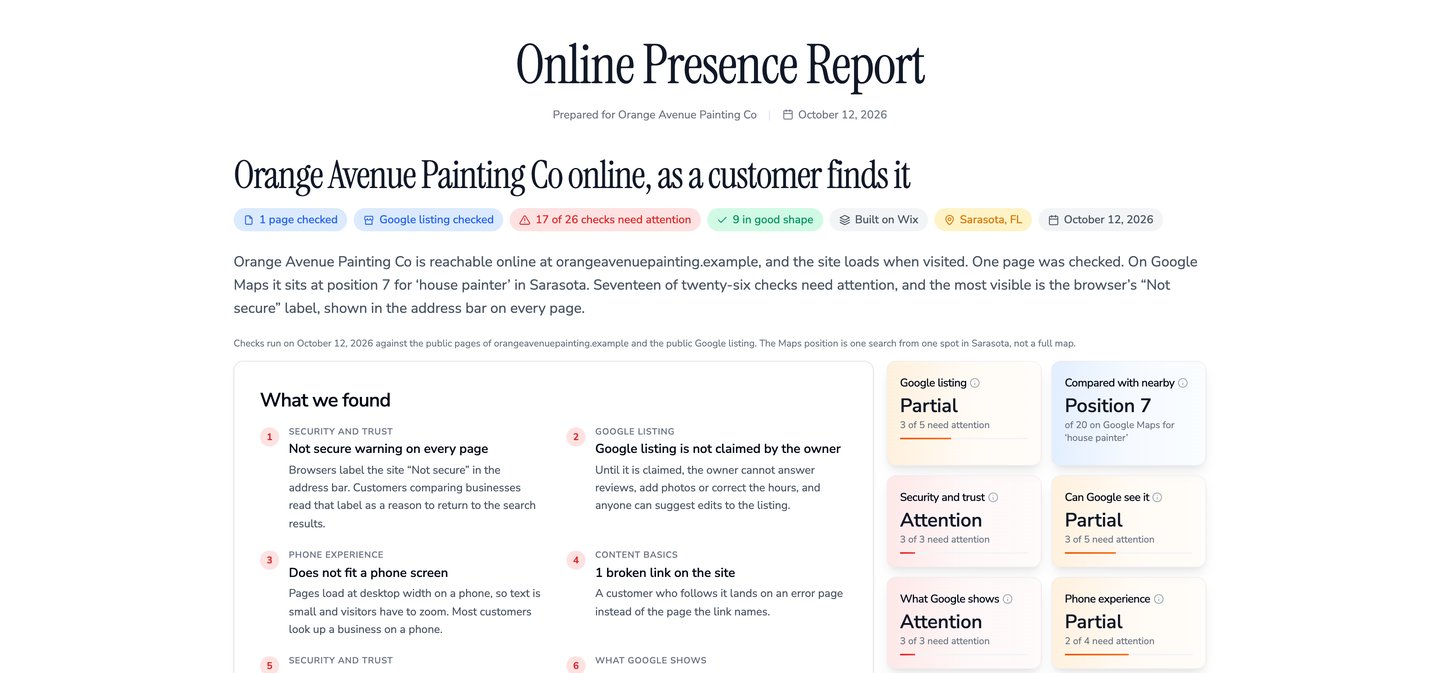
20 Point-by-Point Checks
We analyze their security, SEO basics, mobile experience, and Google footprint. We don’t just list technical issues; we explain exactly what it costs their business in plain English.
Your Brand, Front and Center
Every report carries your agency’s name, logo, brand colors, and reply-to email.
Frictionless Sharing
Generate reports for free. You get a clean, unindexed URL to drop straight into your cold emails or DMs. No sign-ins required for the prospect to view it.
Why stop at one city? Target an entire state or custom region with a single keyword. Set your depth limits, and ShowFirst will automatically deduplicate businesses that rank in multiple areas. Pause, resume, or stop your campaigns at any time.
Connect ShowFirst’s MCP server directly to Claude, Cursor, or ChatGPT to build your own lead-gen assistant. Tell your AI what you want, and it handles the heavy lifting—from running regional searches to exporting formatted CSVs.
claude mcp add --transport http showfirst https://showfirst.app/api/mcp \
--header "Authorization: Bearer YOUR_API_KEY"
# Keys start with lgen_. Make one under API Keys in your dashboard.
{
"mcpServers": {
"showfirst": {
"command": "npx",
"args": ["mcp-remote", "https://showfirst.app/api/mcp",
"--header", "Authorization: Bearer YOUR_API_KEY"]
}
}
}
{
"mcpServers": {
"showfirst": {
"url": "https://showfirst.app/api/mcp",
"headers": { "Authorization": "Bearer YOUR_API_KEY" }
}
}
}
1. Settings → turn on developer mode → Add a connector
2. Server URL: https://showfirst.app/api/mcp
3. Authentication: OAuth
4. ChatGPT opens ShowFirst. Sign in and press Allow.
# No API key needed. The app acts as your account.
1. Settings → Connectors → Add custom connector
2. Server URL: https://showfirst.app/api/mcp → Add → Connect
3. Sign in to ShowFirst and press Allow.
# No API key needed. The app acts as your account.
Prefer plain HTTP? The same searches run through the REST API, and a skill file teaches coding agents both.
One credit = one business profile. Credits are only held when a search starts, and any unused credits are immediately refunded when it finishes.
$0100 lead credits · no card
$29a month · $49 a month after the first 20 seats
Site builds are available on request.
Every business Google Maps lists for that trade in that city, up to the depth you set: 100, 300, 500 or 700. Each one comes back with all 29 columns filled where the data exists.
From Google Maps, then each business’s own website.
Each address is read from the business’s own public pages and listings, up to three per business, and checked against its mail server before it is marked Verified. ShowFirst never generates or guesses an address.
Yes. A campaign runs one keyword across a list of cities, a region or a state, at a depth you set per location, and removes the businesses that appear in more than one place.
Yes. Every search downloads as a CSV: Simple, Advanced, GoHighLevel or Instantly. The same data is available through the API and the MCP server.
A one-page report on a business’s website, under your agency’s name, logo and colour. Make it from any lead’s page and send the link. Anyone with the link can open it; search engines are told not to list it.
Yes. You get the listing, phone detail and reviews, and the report for that business says it has no website a customer can find.
Lead credits are spent per business a search returns. A search holds credits equal to the result count you pick, and unused credits come back when it finishes. A free account starts with 100 lead credits and is topped up to 100 at the start of every month. Founders adds 10,000 a month.
No. A free account has no card on file. Founders is month to month and ends from the dashboard.
Yes. Create a key on the API keys page in the dashboard and run searches and campaigns from your own tools, or connect the MCP server to Claude, Cursor or ChatGPT.
Pick a trade, pick a city. 100 lead credits every month, no card.